Contacts
- 4.4
- Rating
- 100.00K
- Installs
- Free
- Price

 Analysis by App-foxy
When a phone becomes the place where work calls, family updates, delivery questions, and quick messages all collide, the small delays between finding a person and contacting them start to matter. I tested Contacts with that everyday problem in mind. It is a free communication app from Vanshit Infosoft, built around reaching people quickly rather than turning communication into a large, feature-heavy experience. Its focus is simple: make calling, messaging, and favorite contacts easier to reach.
That simplicity is the main reason I found it interesting. A conventional phone app already lets me search contacts, place calls, and send messages, so this app has to earn its place by improving the rhythm of those actions. In my experience, the value is less about replacing every communication tool and more about reducing the tiny moments of hesitation that happen when I am in a hurry. If I already know who I need, a direct path to that person feels more useful than a screen crowded with options.
How Contacts fits into the way I communicate
The app sits in the communication category and is available at no cost, with an Everyone age rating. It runs on Android devices using version 8.0 or later, which makes it accessible to people using older phones as well as newer models. The current release is version 1.0, so I approached it as a focused first version rather than a mature replacement for every function in a phone’s built-in communication system.
You May Also Like

 Blood Strike: 2.5 Anniversary
Blood Strike’s Loadouts Turn Every Drop Into a Tactical Gamble
A close look at Blood Strike’s custom loadouts: how fast access to signature weapons reshapes its battle royale rhythm, rewards preparation, and narrows the gap between fights.

 Pandora - Music & Podcasts
Pandora’s Music Is Easy to Start, but Harder to Recover
Pandora’s strength is its low-effort path from a seed to a station. Its weak spot is how much confidence it asks you to place in connection, setup, and quiet recovery.

 8 Ball Pool
 Is Built on Rivalries, Rematches, and Routine
A close look at the rivalries, rematches, shared routines, and unanswered safety questions that turn a quick pool match into a persistent mobile community.

 Samsung Music
’s Quiet Strength Is Playing What You Already Own
Its reach comes less from spectacle than from dependable access to a personal library. That simplicity is both the app’s strongest retention engine and its ceiling.

 AccuWeather: Weather Radar
AccuWeather Review: A Quick, Clear Forecast for Everyday Decisions
For everyday plans, the best forecast is the one you can understand quickly. AccuWeather makes rain timing, radar, and local conditions easy to act on, with a few trade-offs.

 Hill Climb Racing
Why Hill Climb Racing Still Turns Crashes Into One More Run
A tiny car, a bumpy hill and one more upgrade: Hill Climb Racing keeps resurfacing because its simple chaos makes every near-miss feel personal.
More From Our News Desk
View All News


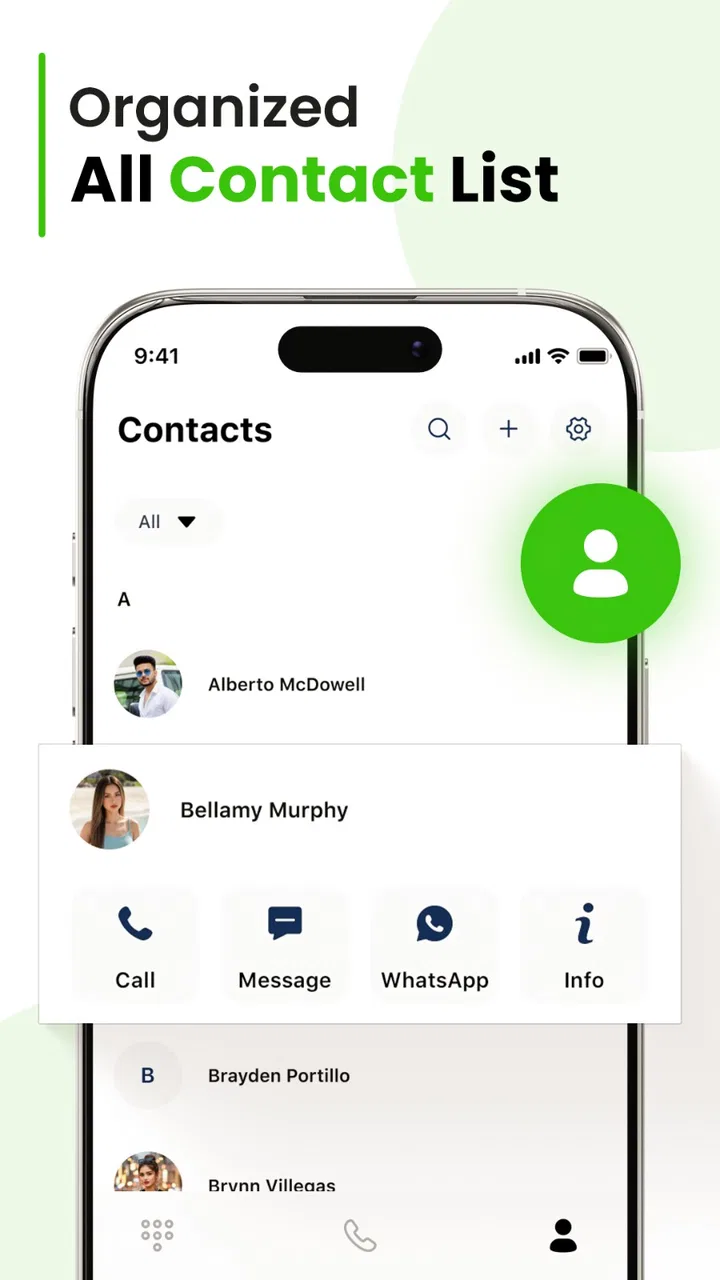
Its public store identity is unusually brief: the short description is simply “Contacts.” That tells me the app is not trying to sell a complicated communication philosophy. Instead, it presents itself as a practical tool for reaching the people already in my address book. The broader summary points to quick calls, messages, and favorites, and those three actions describe the experience more accurately than any long list of promises.
In daily use, I would place this kind of app between the standard contacts list and a full-featured dialer. The usual contacts app is dependable, but it can make me search through names every time. A full dialer may include call history, keypad controls, spam tools, recording options, or other additions that are useful for some people but distracting for others. Contacts makes more sense for someone who wants the first layer of communication to stay clear and direct.
Reducing the pause before a call
The most useful scenario is one I encounter often: I am carrying groceries, walking between rooms, or trying to leave for an appointment, and I need to contact one particular person. Searching through a long list, opening a profile, deciding whether to call or message, and then returning to another task creates more friction than the communication itself deserves. A favorite-based approach can shorten that sequence for the people I contact repeatedly.
This is not only about speed. It changes the feeling of communication. When a person is easy to reach, I am less likely to postpone a small clarification and let it become a larger problem. A quick message to confirm a meeting place or a short call to check on a family member becomes a deliberate action instead of another item I keep mentally carrying.
There is a trade-off, though. Favorites are most valuable when they reflect my current life. If I add too many people, the shortcut loses its purpose and becomes another list to scan. I would keep it limited to contacts I reach frequently, not every person I may need once a month. That small discipline is important because the app’s advantage depends on reducing choice, not displaying all possible choices at once.
Keeping calls and messages in the same decision
I also like the idea of treating a call and a message as two ways to handle the same communication need. Many phone interfaces make me open a contact, choose one action, go back, and then repeat the process if the first choice feels wrong. A focused dialer can make that decision feel more immediate: call when tone matters, message when the answer can wait, and avoid opening a separate app just to change channels.
That distinction is helpful in real situations. If I need a quick yes-or-no answer before leaving home, a call is probably clearer. If I am sending an address or asking someone to reply when convenient, a message creates less pressure. The app does not need to decide for me; its job is to keep both options close enough that I can choose based on the situation rather than on interface friction.
One practical habit I would recommend is using the favorite area as a communication priority list. I would group people by frequency of contact, not by emotional importance or status. That keeps the screen useful during busy moments and avoids turning a shortcut into a miniature social directory. For occasional contacts, the regular contact search remains the better route.
What it changes about attention
The strongest benefit is not necessarily the number of taps saved. It is the reduction in attention spent navigating. A communication tool can quietly become a source of distraction when every attempt to contact someone exposes call history, unrelated notifications, promotional panels, or extra settings. A focused experience gives me a better chance of completing one communication task and returning to what I was doing.
This matters especially for people who use their phone while working from home. A message to a colleague can easily become a glance at several other conversations, while a call to a family member can turn into an unplanned tour through the phone. Contacts is appealing when I want the device to behave more like a tool than a social feed. I can decide the purpose before opening it and leave once that purpose is complete.
At the same time, a simpler dialer is not automatically less distracting. The distraction can come from the communication itself, not only from the interface. A favorite contact may be easy to reach, but that does not mean every moment is a good time to call. I found the app most useful when I paired its quick access with a personal rule: if the matter is not urgent, send a message or wait until I can give the conversation proper attention.
Another non-obvious advantage is clarity after interruption. If I am interrupted halfway through a task, I want to remember why I opened the phone. A direct contact tool supports a more intentional sequence: choose the person, choose the channel, complete the exchange, and close the app. That is a small workflow, but it can prevent the scattered feeling that comes from bouncing between contact search, messaging, and unrelated phone features.
Boundaries are part of good communication
Quick contact access can improve responsiveness, but it can also make me feel permanently available. That is where I think users need to set boundaries around the app rather than expecting the app to set them automatically. I would use favorites for people I genuinely need to reach often, while resisting the urge to make every contact equally immediate.
For example, if I am handling work and personal communication on the same phone, I would separate the question of access from the question of urgency. A colleague may be easy to message during working hours, while a family member may be easy to call in the evening. The app can shorten the route to both people, but I still need to choose an appropriate channel and time. Convenience should support judgment, not replace it.
This is also why I would not recommend making Contacts the only communication tool for someone who needs extensive organization. People who rely on detailed call management, advanced filtering, business records, or a broad set of built-in phone controls may prefer the default dialer or a more established communication suite. A focused app is better when the problem is access and clarity, not when the problem is managing a large communication operation.
Privacy and control should also be part of a sensible setup. I would review the contact entries I actually use, remove outdated numbers from my personal address book, and avoid treating the favorites area as a complete record of everyone I know. Keeping the list current improves both speed and accuracy. Calling the wrong old number is worse than taking a few extra seconds to search.
Where it compares with the usual alternatives
The built-in phone app remains the obvious alternative, and it has one major advantage: it is already integrated into the device. It may feel more familiar, and many users will not need anything beyond its standard contacts and call history. Contacts is worth considering when that default experience feels cluttered or when reaching a small group of people requires too much searching.
Messaging platforms are another alternative, but they are designed around conversation networks rather than the phone’s central address book. They can be better for group chats, media sharing, read indicators, and ongoing threads. They are less convenient when I simply need to choose a saved contact and decide between a normal call and a text. Contacts occupies that quieter space between the phone’s address book and the larger social communication platforms.
A feature-rich third-party dialer may be a stronger choice for users who want spam identification, extensive call history controls, customization, or professional calling tools. I would choose such an option for a business phone or for a person who spends much of the day managing calls. I would choose Contacts instead for a cleaner, narrower routine where the main goal is to reach familiar people without opening a large control panel.
The app has also attracted a meaningful early audience, with an average rating of 4.4 from around 1.1 thousand ratings and more than 100 thousand installs. Those figures suggest that the basic idea has found interest, but they should not be treated as proof that it will suit every phone or every communication style. The experience depends heavily on whether quick access to personal contacts is actually the problem I am trying to solve.
Who should use it, and who should skip it
I would recommend Contacts to someone who frequently calls or messages the same small circle and wants those people closer to hand. It is also a sensible option for a user who finds a standard contacts list visually busy, or for someone who wants to reduce the time spent deciding where to begin a communication task. Older Android devices may also benefit from an app whose stated minimum system requirement is not limited to recent operating system releases.
I would be more cautious about recommending it to someone who expects a complete replacement for every phone feature. If call screening, business contact management, deep customization, or advanced history tools are central to your routine, the default dialer or a more specialized alternative may be a better fit. Likewise, if most of your communication happens inside one messaging service, a dedicated contacts shortcut may not change your habits very much.
Because the app is at version 1.0, I would also approach it with realistic expectations. A first release can be appealing precisely because it is focused, but users who need a long-established ecosystem may prefer a tool with a longer history of refinements. That is not a criticism of Vanshit Infosoft; it is simply the practical difference between choosing a compact utility and choosing a deeply developed communication platform.
My verdict after using it as a daily shortcut
Contacts works best when communication needs to feel intentional rather than expansive. I found its appeal in the short path from seeing a person’s name to choosing a call or message. That path can make everyday contact feel lighter, especially when I am busy and do not want a phone interaction to turn into a long session of browsing.
Its real strength is the way it can shape attention. By keeping familiar people and basic communication actions close together, it encourages me to finish one task instead of wandering through a crowded interface. The trade-off is that it does not appear aimed at users who want a complete command center for calls, messaging, and contact administration.
For me, the right way to use it would be deliberately: keep favorites limited, use calls for matters that benefit from immediate tone, use messages when the other person needs space to respond, and avoid confusing quick access with constant availability. Used that way, this free communication app from Vanshit Infosoft is a practical choice for people who want less friction around ordinary conversations.
If that describes your phone habits, Contacts is worth trying as a focused alternative to a busy default dialer. If your needs are more advanced, or if your communication already lives almost entirely inside a single messaging platform, the usual alternatives may serve you better. My overall impression is positive, but specifically for users who value a clear route to a few important people over a long list of extra tools.
FAQs for Contacts
01What features does the Contacts app offer?
The Contacts app provides users with a comprehensive suite for managing their contacts effectively. It includes features such as contact synchronization across devices, integration with email and social media accounts, customizable contact groups, advanced search functions, and the ability to add notes or special dates to each contact. These features ensure users can manage their connections effortlessly.
02Is the Contacts app free to use, or are there any in-app purchases?
The Contacts app is free to download and use, offering a wide range of features without any cost. However, there are optional in-app purchases for premium features like advanced analytics, cloud backup, or ad-free experiences. These purchases are not mandatory and are tailored for users seeking enhanced functionality.
03How secure is my data in the Contacts app?
Security is a top priority for the Contacts app. It uses end-to-end encryption to protect user data, ensuring that your contact information is secure both during transmission and storage. Additionally, the app complies with international data protection regulations, giving users peace of mind regarding their privacy and data safety.
04Can I import and export contacts easily with this app?
Yes, the Contacts app supports seamless import and export of contacts. It allows users to import contacts from various sources like SIM cards, CSV files, and other contact management apps. Similarly, exporting your contact list to different formats or directly to other apps is straightforward, ensuring migration and backup processes are hassle-free.
05Does the Contacts app support integration with other apps?
The Contacts app is designed to integrate smoothly with numerous other applications, such as email clients, messaging apps, and social media platforms. This integration facilitates easy sharing and updating of contact information across different services, enhancing productivity and connectivity for users who rely on multiple apps.
Pros
- User-friendly interface for easy navigation.
- Seamless sync across devices.
- Customizable contact groups.
- Integrated with email and messaging apps.
- Quick import/export options.
Cons
- Limited advanced search features.
- Occasional sync delays.
- No dark mode option.
- Ads may be distracting.
- Some features require in-app purchases.

Contacts
Gallery